Alphanumeric Codes: How They Help Your Devices Work
2026-04-29
180
Alphanumeric codes are used in everyday technology, from WiFi passwords and product keys to QR codes and tracking numbers. These codes combine letters and numbers to help systems store, identify, and protect information in a simple and efficient way. Computers rely on them to process data, verify you, and keep systems secure. This article will discuss what alphanumeric codes are, how they work, the different types used today, and how they are applied in actual circuit.
Catalog
Figure 1. Digital Code Data Flow
What Is an Alphanumeric Code?
An alphanumeric code is a mix of letters (A–Z) and numbers (0–9), sometimes with simple symbols like - or @. These codes are used by computers to store and process information in a clear and organized way.
You already use alphanumeric codes every day. A WiFi password like Home1234, a product key such as ABCD-1234-EFGH, or a delivery tracking number are all examples. Even QR codes contain hidden alphanumeric data that systems can quickly read and understand.
These codes are basic since computers do not read words the way people do. They rely on structured combinations to handle data accurately and fast. Using both letters and numbers also allows more unique combinations, which helps avoid duplication and improves security.
Behind the scenes, every letter and number is converted into a numeric value using standards like ASCII or Unicode. This is how computers are able to display and process text correctly.
Why Alphanumeric Codes Are Important in Everyday Systems
Alphanumeric codes are used in almost every modern system as they help keep data simple and organized. They make it easy to identify things like people, devices, or products by giving each one a unique code. They also improve security, since passwords use a mix of letters and numbers to make them harder to guess. At the same time, these codes help computers work faster as short and clear codes are easier to process than long text.
You can see this in daily life. Your phone uses a password to connect to WiFi, your online accounts need secure login details, and software uses product keys to confirm it is original. Delivery companies also use tracking numbers to follow your package step by step. Behind the scenes, computers read these codes using systems like ASCII or Unicode so everything shows correctly.
How Alphanumeric Codes Work
When you type a letter or number on your keyboard, the computer does not actually see the character itself. Instead, it converts that input into binary data made of 0s and 1s. For example, the letter A is stored as a specific number based on an encoding system, and the number 1 is also converted into its own binary form. This process is called encoding, and it allows computers to handle text in a way they can understand. Common encoding systems like ASCII or Unicode assign a unique value to each character so it can be stored and processed correctly. The table below shows how computers convert characters into numbers using ASCII. Each value is stored in binary so the system can process it.
Example: ASCII Encoding Table
|
Decimal |
Binary |
HEX |
OCT |
Symbol |
Description |
|
0 |
00000000 |
0 |
0 |
NUL |
It is a null character |
|
1 |
00000001 |
01 |
001 |
SOH |
Start of Heading |
|
2 |
00000010 |
02 |
002 |
STX |
Start of Text |
|
3 |
00000011 |
03 |
003 |
ETX |
End of Text |
|
4 |
00000100 |
04 |
004 |
EOT |
End of Transmission |
|
5 |
00000101 |
05 |
005 |
ENQ |
Enquiry |
|
6 |
00000110 |
06 |
006 |
ACK |
Acknowledgment |
|
7 |
00000111 |
07 |
007 |
BEL |
Bell |
|
8 |
00001000 |
08 |
008 |
BS |
Back Space |
This example shows control characters used by systems to manage data. The full ASCII table also includes letters (A–Z) and numbers (0–9), which follow the same process. Once the data is encoded, the computer can store it in memory, send it across the internet, or use it in programs. When you open a file, type a message, or visit a website, the system decodes that binary data back into readable text so you can see it on your screen.
Types of Alphanumeric Codes Used Today
There are different systems used to represent alphanumeric characters, and each one was created to help computers understand text in a structured way. One of the earliest systems is ASCII(American Standard Code for Information Interchange), which uses numbers to represent letters, numbers, and basic symbols. It is simple and fast, but it is limited since it mainly supports English characters. Another system is EBCDIC (Extended Binary Coded Decimal Interchange Code), which was used in older IBM computers. It is not common today, but you may still find it in some legacy systems.
The most widely used system today is Unicode. This modern standard can represent many languages, including English, Chinese, Arabic, and more, making it suitable for global communication. It is used in websites, mobile apps, and operating systems, which is why you can read and type different languages on your phone or computer without problems.
ASCII vs Unicode: Which One Is Better
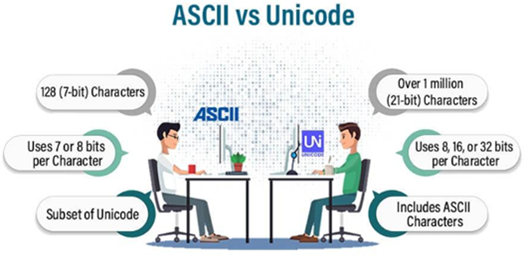
Figure 2. ASCII vs Unicode Comparison
When comparing ASCII and Unicode, the main difference is how much text they can handle. ASCII is simple and lightweight, which makes it fast and easy to use, but it is limited as it mainly supports basic English letters, numbers, and a few symbols. This means it works well for simple systems, but it cannot handle different languages or special characters. Unicode, on the other hand, is designed for modern use. It supports a wide range of languages and symbols, including emojis, making it much more flexible.
In our modern systems, Unicode is the better choice since most systems need to support global communication. For example, websites, apps, and social media platforms use Unicode so you can read and write in different languages without errors. While ASCII is still useful in some simple or older systems, Unicode is now the standard as it can handle more data and works across almost all modern devices.
File Hashes: How Alphanumeric Codes Protect Your Data
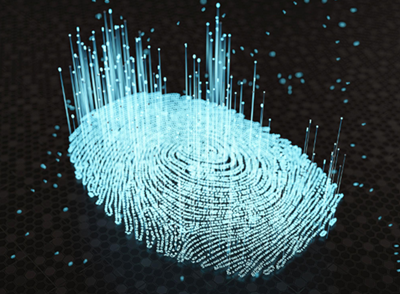
Figure 3. File Hash Fingerprint Concept
A file hash is a unique alphanumeric code created from a file, and it works like a digital fingerprint. Even a small change in the file, such as adding or removing one character, will create a completely different hash value. This is what makes file hashes very useful for checking if a file is safe and unchanged. Common hash types include MD5 and SHA-256, which are used by systems to generate these unique codes.
In practical use, file hashes help verify downloads, detect any changes in files, and make sure data stays accurate. For example, when you download software, the official website may provide a hash value. You can compare it with the hash of your downloaded file. If both values match, it means the file has not been altered and is safe to use. If they do not match, the file may be corrupted or tampered with.
Product Keys and Serial Numbers: How Systems Verify Devices
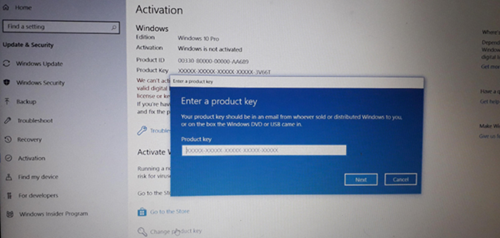
Figure 4. Windows Product Key Verification
Product keys and serial numbers are alphanumeric codes used to identify and verify products in a simple and reliable way. You can see them in everyday items like a Windows activation key, software license codes, or the serial number printed on a device. Each code is unique, which allows systems to recognize a specific product and confirm that it is original.
In everyday use, these codes help prevent unauthorized use, track products, and activate software legally. For example, when you install software, the system checks the product key to make sure it is valid before allowing full access. Device serial numbers also help companies track manufacturing details, warranty status, and repairs. These alphanumeric codes act like an ID card for products, helping systems keep things secure, organized, and easy to manage.
Barcodes and QR Codes: How Alphanumeric Data Is Stored and Scanned
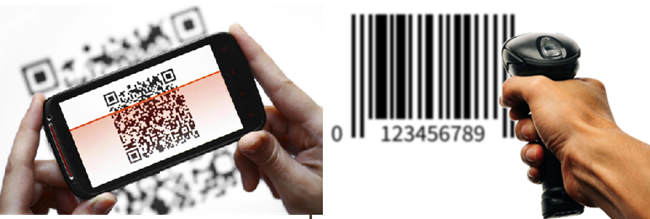
Figure 5. Barcode and QR Code Scanning
Alphanumeric codes can be converted into barcode or QR code formats so machines can read them quickly. These formats turn letters and numbers into visual patterns that scanners and devices can understand. Here's how each one works.
Barcode
Barcodes are visual patterns made of lines that represent data. They are commonly used in stores and inventory systems. One popular type is Code 128, which can handle alphanumeric characters.
Choose the barcode type – Select a format like Code 128 that supports letters and numbers.
Convert characters into numbers – Each letter or number is changed into a numeric value, often using systems like ASCII.
Add start and end markers – Special patterns are added so the scanner knows where the code begins and ends.
Create the barcode pattern – The system turns the data into a series of lines (bars and spaces).
Scan the barcode – A scanner reads the pattern and converts it back into the original alphanumeric code.
QR Code
QR codes are more advanced as they use square patterns and can store more data than barcodes. They are widely applied for payments, links, and digital information.
Use a QR code generator – A tool or software is used to create the code.
Enter the data – Type the alphanumeric code or information you want to store.
Generate the QR pattern – The system converts the data into a square grid pattern.
Display or print the code – It can be shown on a screen or printed on paper.
Scan with a device – A smartphone or scanner reads the pattern and shows the stored data, such as text, a link, or payment details.
MAC Addresses Explained: How Devices Are Identified in a Network
A MAC address (Media Access Control address) is a unique alphanumeric code assigned to a device’s network interface, such as the WiFi or Ethernet hardware inside your phone, laptop, or router. It usually looks like 00:1A:2B:3C:4D:5E, which is a mix of numbers and letters separated by colons. This code is built into the device by the manufacturer, so no two devices should have the same MAC address.
In a network, the MAC address is used to identify each device clearly. For example, when your phone connects to WiFi, the router uses the MAC address to recognize your device and allow communication. It also helps manage connections, such as controlling which devices can access the network or limiting bandwidth for certain devices. Some networks even use MAC filtering as a basic security method, allowing only approved devices to connect.
How Alphanumeric Codes Improve Security
Alphanumeric codes help keep your data safe as they make it harder for other people to guess your information. Instead of using only numbers, systems use a mix of letters and numbers for things like passwords, verification codes, and security keys. For example, when you log into an account, you enter a password, and sometimes you also receive a one-time code (OTP) to confirm it’s really you.
This works because adding letters makes the code more complex. A simple code like 123456 is very easy to guess, but something like Pass123 is harder. Still, it is better to use longer and more mixed combinations to stay safe. The more complex the code, the harder it is for hackers to break it.
Alphanumeric vs Numeric Codes: When Should You Use Each?
Alphanumeric codes and numeric codes are both used in systems, but they serve different purposes. Alphanumeric codes use a mix of letters and numbers, which makes them more secure and able to store more information. This is why they are commonly used in passwords, product keys, and your IDs, where protection and uniqueness are required. On the other hand, numeric codes use only numbers, so they are simpler and faster to type. As result of this, they are usually found in PINs and one-time passwords (OTPs), where quick access is required.
|
Feature |
Alphanumeric
Codes |
Numeric
Codes |
|
Characters Used |
Letters and numbers |
Numbers only |
|
Security Level |
Higher (more
combinations) |
Lower (fewer
combinations) |
|
Ease of Use |
Slightly harder to
type |
Very easy to type |
|
Data Capacity |
Can store more
information |
Limited information |
|
Common Uses |
Passwords, IDs,
product keys |
PINs, OTPs, quick
access |
 Σχετικά με εμάς
Ικανοποίηση του πελάτη κάθε φορά.Αμοιβαία εμπιστοσύνη και κοινά συμφέροντα.
Σχετικά με εμάς
Ικανοποίηση του πελάτη κάθε φορά.Αμοιβαία εμπιστοσύνη και κοινά συμφέροντα.
δοκιμή λειτουργίας.Τα υψηλότερα οικονομικά αποδοτικά προϊόντα και η καλύτερη υπηρεσία είναι η αιώνια δέσμευσή μας.
Καυτό άρθρο
- LM358 Διπλός λειτουργικός ενισχυτής Περιεκτικός οδηγός: Pinouts, διαγράμματα κυκλώματος, ισοδύναμα, χρήσιμα παραδείγματα
- Είναι εναλλάξιμα τα CR2032 και CR2016;
- Κατανόηση των διαφορών ESP32 και ESP32-S3 Τεχνική και ανάλυση απόδοσης
- Επιλέγοντας τη σωστή μπαταρία: Οδηγός για τα AG4, LR626, LR66, 177/376/377, SR626 και SR626SW ισοδύναμα
- NPN εναντίον PNP: Ποια είναι η διαφορά;
- Βασικά στοιχεία τρανζίστορ BC547: Pinout, κυκλώματα εφαρμογής, εναλλακτικά/συμπληρωματικά μοντέλα
- ESP32 VS STM32: Ποιος μικροελεγκτής είναι καλύτερος για εσάς;
- Τι είναι το MOSFET και πώς λειτουργεί;
- Ηλεκτρικό ρελέ Basic: Λειτουργία εργασίας, τύποι και χρήσεις
- Τρανζίστορ PNP: δομή, αρχή εργασίας και εφαρμογή
 Πώς λειτουργούν τα ρεύματα ολίσθησης και διάχυσης στους ημιαγωγούς
2026-04-30
 Τι είναι οι ηλεκτρολύτες και οι μη ηλεκτρολύτες;Παραδείγματα και Διαφορές
2026-04-29
Συχνές ερωτήσεις [FAQ]
1. Why do modern systems prefer Unicode over ASCII in actual applications?
Unicode is preferred because it supports multiple languages, symbols, and emojis, while ASCII is limited to basic English characters. In global systems like websites and mobile apps, Unicode ensures that text displays correctly across different regions and devices.
2. How does encoding convert human-readable text into machine-readable data?
Encoding assigns a unique numeric value to each character using standards like ASCII or Unicode. These values are then converted into binary (0s and 1s), which computers can store, process, and transmit efficiently.
3. Why do small changes in a file create completely different hash values?
Hash functions are designed to be highly sensitive to input changes. Even a single character difference produces a completely different output, which helps detect file tampering and ensures data integrity.
4. What is the difference between a MAC address and an IP address in a network?
A MAC address is a permanent hardware identifier assigned to a device, while an IP address is a temporary address used for communication within a network. The MAC address identifies the device itself, while the IP address identifies its location in the network.
5. Why are alphanumeric passwords more secure than numeric-only passwords?
Alphanumeric passwords increase the number of possible combinations by including both letters and numbers. This makes them harder to guess or crack compared to numeric-only passwords, which have fewer possible variations.
6. How do barcodes and QR codes store alphanumeric data differently?
Barcodes store data in one dimension using lines and spaces, while QR codes store data in two dimensions using square patterns. This allows QR codes to hold more information and be scanned from different angles.
Καυτός αριθμός εξαρτήματος
 GQM2195C2E101JB12D
 GRT21BR60J335ME13L
 GJM0335C1ER70WB01D
 CC1206JKNPOCBN820
 C0402C120J8GACTU
 GQM1555C2D1R9CB01D
 LD055A100KAB2A
 12103A123JAT2A
 TAP226K010BRW
 CWR09HC106KB
- CY28317PVXC-2T
- GAL22V10D-25LJI
- A40MX02-FPL68
- MCP6472T-E/MS
- AP1601M10G-13
- CPC2025N
- RC1206FR-0751KL
- ATF857S12L
- DD160N22K
- TMS320F28PLC83PNT
- LT3014EDD#TRPBF
- MC14052BFEL
- SZMM3Z5V6T1G
- NC7S00M5X
- MC1488MELG
- XC6SLX150T-2FGG484I
- AD5625BRUZ
- ADUM1400BRW
- XC7K70T-2FBG484C
- MB90F346ASPMC-GSE1
- CY505YC56CS
- GE28F128W30BD70
- MMA7660FC
- MT47H32M16NF-25EIT:H
- SC29432VKO
- SKY77660-11
- SM72444MT
- TAS5142DKDG4
- AX6603-180BA
- AN7323S-E2V-A
- CM7012L3-T4
- MC74F86D
- SCS138EC10
- T73L02MIV
- XPC755BRX400LD
- QCA8827-AL3B
- CP2266LP-A2
- CLU028-1202C4-403M2K1-B13
- TLP225A(TP1.F)